
Willkommen bei WordPress. Dies ist dein erster Beitrag. Bearbeite oder lösche ihn und beginne mit dem Schreiben!
HoloLens 2 Setup
Was brauchen wir?
Visual Studio 2019
- MSBuild
- Windows 10 SDK 10.0.18632.0
Unity 2019.4.3f1
- Mit den UWP Build Tools
Das MRTK an der Stelle die 2 Downloads: Foundation und Extensions
Siehe auch MRTK
WeiterlesenDebugging your Android App in Eclipse
I want do debug my Android Application inside Eclipse and not the Android-Studio.
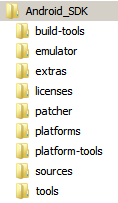
First we need the Android SDK.
Hololens setup
Today we will setup a Hololensproject with C#
First: download the Visual Studio
Second: download Unity
Third: download the Holo-Toolkit
Star Citizen Wichtige Tastaturbefehle
Einfach mal so die wichtigen Tasten aus meiner Sicht um in das Spiel zu kommen.
Immer aktivierbar:
F1= Mobiglass
F4=Kamera ändern
T=Taschenlampe
F11=Freuende liste
F12=Chat
F=Aktion
Zu Fuß:
STRG=Ducken
STRG(Lang)=Kriechen
1=Waffe ziehen
V=Waffe weg
Y=Wenn die Kamera draußen ist diese frei bewegen
Im Schiff:
ALT+F(Halten)=Aussteigen
Q,W,E,A,S,D,STRG,Leer=Fliegen
X=Handbremse
V=Geschwindigkeitsmodi wechseln
shift*2=Booster aktivieren
F3=Cursor aktivieren
F=Gegenmaßnahmen wechseln
F(halten)=Gegenmaßnahmen auswerfen
B=Quantantrieb
R=Nächster Gegner
T=Nächstes Ziel
N=Landemodus –> F=Landeerlaubnis erfragen
ALT GR+N=Automatisches Landen
JavaFX Scenebuilder speedup
Ich hatte kürzlich das Problem das ich eine FXML im Scenebuilder bearbeiten wollte und die FX-IDs vergeben wollte.
Das auswählen einer Textbox hat ca. 30 Sekunden gedauert sowie das anschließende auswählen der ID über die Combobox.
Hintergrund war der das der Controller der zu der FXML gehört recht groß ist und dieser bei jedem klick im Scenebuilder neu geparst wird.
Der Hack wird in folgender Klasse gemacht: com.oracle.javafx.scenebuilder.kit.glossary.BuiltinGlossary
Hierzu wird das letzte Ergebnis + das Letzte Editierdatum der Datei gemerkt:
[codesyntax lang=“java“]
    //NEU
    private long lastUpdatequeryControllerClasses = 0;
    //NEU
    private List<String> resqueryControllerClasses ;

    @Override

    public List<String> queryControllerClasses(URL fxmlLocation) {

        if (fxmlLocation == null ) {

            return Collections.emptyList();

        } else {

            File fxmlFile = getFileFromURL(fxmlLocation);

            if (! fxmlFile.exists()) {

                // Suspicious ! May I print some warning ? or assert the file exists ?

                return Collections.emptyList();

            } else {

                //Speedhack

                if(resqueryControllerClasses == null || lastUpdatequeryControllerClasses < fxmlFile.lastModified()){

                List<String> res = new ArrayList<>();

                for (ControllerClass cc : ControllerClass.discoverFXMLControllerClasses(fxmlFile)) {

                    if (! res.contains(cc.getClassName())) {

                        res.add(cc.getClassName());

                    }

                }

                Collections.sort(res);
		//NEU
                resqueryControllerClasses=res;

                lastUpdatequeryControllerClasses = fxmlFile.lastModified();

                return res;

                }

                return resqueryControllerClasses;

            }

        }

    }
    //NEU
    private long lastUpdatequeryFxIds = 0;

    private List<String> resqueryFxIds ;

    @Override

    public List<String> queryFxIds(URL fxmlLocation, String controllerClass, Class<?> targetType) {

        // TODO fix DTL-5878

        assert controllerClass != null;

        if (fxmlLocation == null ) {

            return Collections.emptyList();

        } else {

            File fxmlFile = getFileFromURL(fxmlLocation);

            if (! fxmlFile.exists()) {

                // Suspicious ! May I print some warning ? or assert the file exists ?

                return Collections.emptyList();

            } else {
		//NEU
                if(resqueryFxIds == null || lastUpdatequeryFxIds < fxmlFile.lastModified()){

                List<String> res = new ArrayList<>();

                for (ControllerClass cc : ControllerClass.discoverFXMLControllerClasses(fxmlFile)) {

                    if (controllerClass.equals(cc.getClassName())) {

                        res.addAll(cc.getFxIds());

                        break;  // discoverFXMLControllerClasses may return duplicates.

                                // The first matching class name is good enough for now.

                    }

                }

                Collections.sort(res);

                resQueryEventHandlers=res;

                lastUpdatequeryFxIds = fxmlFile.lastModified();

                return res;

                }

                return resqueryFxIds;

            }

        }

    }
    //NEU
    private long lastUpdatequeryEventHandlers = 0;

    private List<String> resQueryEventHandlers ;

    @Override

    public List<String> queryEventHandlers(URL fxmlLocation, String controllerClass) {

        assert controllerClass != null;

        if (fxmlLocation == null ) {

            return Collections.emptyList();

        } else {

            File fxmlFile = getFileFromURL(fxmlLocation);

            if (! fxmlFile.exists()) {

                // Suspicious ! May I print some warning ? or assert the file exists ?

                return Collections.emptyList();

            } else {
		//NEU
                if(resQueryEventHandlers == null || lastUpdatequeryEventHandlers < fxmlFile.lastModified()){

                List<String> res = new ArrayList<>();

                for (ControllerClass cc : ControllerClass.discoverFXMLControllerClasses(fxmlFile)) {

                    if (controllerClass.equals(cc.getClassName())) {

                        res.addAll(cc.getEventHandlers());

                        break;  // discoverFXMLControllerClasses may return duplicates.

                                // The first matching class name is good enough for now.

                    }

                }


                Collections.sort(res);

                resQueryEventHandlers = res;

                lastUpdatequeryEventHandlers = fxmlFile.lastModified();

                return res;

                }return resQueryEventHandlers;

            }

        }

    }
[/codesyntax]
Android ADB manuell verbinden
Da in Eclipse das Android Development Tool nicht mehr weiterentwickelt wird gibt es ein paar Probleme.
Ich möchte wenigstens das Debugging in Eclipse nutzen.
Wie Funktioniert das.
- Wir gehen in unser Android SDK dort existiert der Ordner „platform-tools“
- Commandline öffnen
- Prüfen ob das Gerät verbunden ist „adb devices“
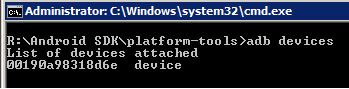
4. Wenn die App gestartet ist prüfen ob es einen Debugbaren Prozess gibt
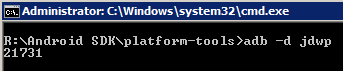
5. Wenn es mehr als einen Prozess gibt müssen wir herausfinden welcher unser Prozess ist.
Hierfür gibt es das Command „adb shell ps $FILTER“ mein Filter ist „hecreator.manga“ wobei meine App ID diese ist „eu.thecreator.manga“
Wichtig es sind die letzten 15 Zeichen von eurem App Namen

6. jetzt müssen wir noch den Port freischalten mit „adb forward tcp:21407 jdwp:XXXX“ bei mir ist es gerade 21731
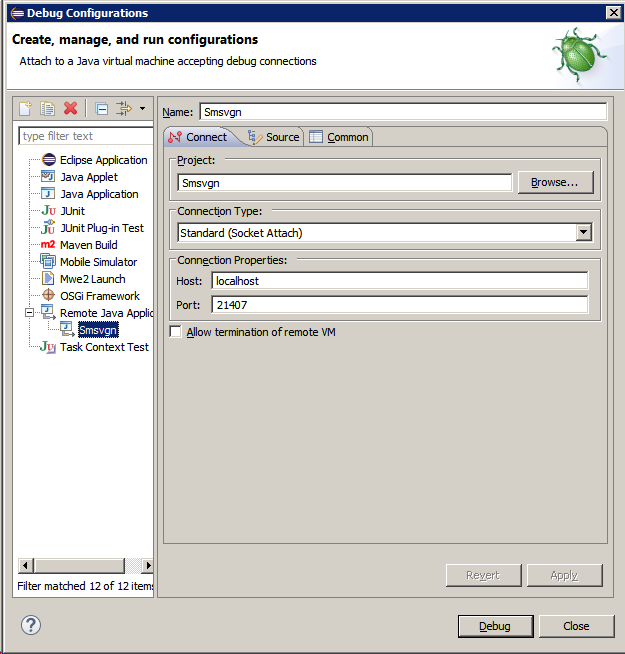
7. In Eclipse nun einfach noch verbinden gegen den Port 21407
Mongodb: Suche in Arrays
Wir haben folgende 2 Mongo Elemente mit internen Arrays „posts“
[codesyntax lang=“glsl“]
{
  "_id" : ObjectId("56d34d6f4f6634a340b8da81"),
  "good" : 478,
  "bad" : 108,
  "extId" : "/ASD",
  "id" : NumberLong(746),
  "posts" : [{
      "order" : 0,
      "time" : "18:53",
      "text" : "Ich hab Block1",
      "leftSide" : true
    }, {
      "order" : 1,
      "time" : null,
      "text" : "Ich suche Block 2",
      "leftSide" : false
    }]
}

/* 1 */
{
  "_id" : ObjectId("56d34d9f4f6634a340b8ddc7"),
  "good" : 836,
  "bad" : 303,
  "extId" : "/chat239782",
  "id" : NumberLong(1482),
  "posts" : [{
      "order" : 0,
      "time" : "23:21",
      "text" : "wirklich ein Highlight.",
      "leftSide" : true
    }]
}
[/codesyntax]
Wenn wir jetzt innerhalb der Elemente suchen wollen brauchen wir etwas um in den Arrays zu suchen.
„$elemMatch “ übernimmt dieser Rolle:
find({ „posts“ : { „$elemMatch“ : { „text“ : /.*Highlight.*/ } } })
JavaFX and the waitcursor is fixed in Java 8.u40!
Today there was a really normal java code like:
setCursor(Waitcursor);
execute something on the server
setCursor(Defaultcursor);
Now the problem… the waitcursor does not appear!
The Code in Swing is still working but not in JavaFX.
There is a (from my point of view) a problem in the current implementation!
Current posts on „stackoverflow“ and other needs a „Task“.
Here is my Implementation with a Testflag „testFlagToUseOnlySetCursor“ to disable my code.
[codesyntax lang=“java“]
import com.sun.javafx.tk.Toolkit;
import java.util.logging.Level;
import java.util.logging.Logger;
import javafx.animation.AnimationTimer;
import javafx.application.Application;
import javafx.application.Platform;
import javafx.event.ActionEvent;
import javafx.event.Event;
import javafx.event.EventHandler;
import javafx.event.EventType;
import javafx.geometry.Orientation;
import javafx.scene.Cursor;
import javafx.scene.Scene;
import javafx.scene.control.Button;
import javafx.scene.layout.FlowPane;
import javafx.stage.Stage;

/**
 *
 * @author andre
 */
public class Cursortest extends Application {

    /**
     * Testflag to check the difference between the original Oracle
     * implementation for the cursor.
     *
     */
    private boolean testFlagToUseOnlySetCursor = false;
    private Scene scene;

    private void addWaitcursorHelper() {

        // The AnimationTimer runs one every Frame
        AnimationTimer timer = new AnimationTimer() {
            boolean wasRendered = false;

            @Override
            public void handle(long now) {
                if (Toolkit.getToolkit().isNestedLoopRunning()) {
                    // One rendering must be running once to display the cursor!
                    if (wasRendered) {
                        Toolkit.getToolkit().exitNestedEventLoop(scene, Boolean.FALSE);
                    }
                    // Flag for one Rendering successful
                    wasRendered = true;
                } else {
                    wasRendered = false;
                }

            }
        };
        timer.start();
    }
    /**
     * Blocking of all! Events when the operation is running
     */
    private EventHandler<Event> blockingHelper = new EventHandler<Event>() {

        @Override
        public void handle(Event event) {
            event.consume();
        }
    };

    @Override
    public void start(Stage primaryStage) {

        Button btn = new Button();
        btn.setText("Perform long action");
        btn.setOnAction(new EventHandler<ActionEvent>() {

            @Override
            public void handle(ActionEvent event) {
                performAction();
            }

        });

        FlowPane root = new FlowPane(Orientation.VERTICAL);
        root.getChildren().add(btn);

        scene = new Scene(root, 300, 250);
        // Helper activation
        if (!testFlagToUseOnlySetCursor) {
            addWaitcursorHelper();
        }
        primaryStage.setTitle("Waitcursordemo");
        primaryStage.setScene(scene);
        primaryStage.show();

    }

    /**
     * @param args the command line arguments
     */
    public static void main(String[] args) {
        launch(args);
    }

    private void realCodeExecution() {
        for (int i = 0; i < 50; i++) {
            try {
                System.out.println("Perform: " + i);
                Thread.sleep(100);
            } catch (InterruptedException ex) {
                Logger.getLogger(Cursortest.class.getName()).log(Level.SEVERE, null, ex);
            }
        }
    }

    private void activateWaitCursor() {
        if (scene.getCursor() == null || !scene.getCursor().equals(Cursor.WAIT)) {
            if (!testFlagToUseOnlySetCursor) {
                //Blocking the events because the user has the chance to click a button in 2 Frames
                scene.addEventFilter(EventType.ROOT, blockingHelper);
            }
            // No multiple activation of the waitcursor and the eventloop
            scene.setCursor(Cursor.WAIT);
            if (!testFlagToUseOnlySetCursor) {
                // Activate a extra eventloop to perform a little hack to draw 2 frames that the cursor is showing
                Toolkit.getToolkit().enterNestedEventLoop(scene);
            }
        }
    }

    private void deactiveWaitCursor() {
        // Remove the cursor on the next paint
        Platform.runLater(new Runnable() {

            @Override
            public void run() {
                if (scene != null) {
                    scene.setCursor(null);
                    scene.removeEventFilter(EventType.ROOT, blockingHelper);
                }
            }
        });

    }

    private void performAction() {
        activateWaitCursor();
        realCodeExecution();
        deactiveWaitCursor();
    }
}
[/codesyntax]
QT Programm auf anderen Computern zum Laufen bringen
Wenn ihr eine QT Applikation auf einen PC Laufen zu lassen braucht ihr einige dlls:
- qwindows.dll
- Qt5WinExtras.dll
- Qt5Core.dll
- qoffscreen.dll
- qminimal.dll
Die Main.cpp muss jedoch erweitert werden da sonst der Windows Painter nicht vorhanden ist.
[codesyntax lang=“cpp“]
#include <windows.h>
std::string ExePath() {
	char buffer[MAX_PATH];
	GetModuleFileName(NULL, buffer, MAX_PATH);
	std::string::size_type pos = std::string(buffer).find_last_of("\\/");
	return std::string(buffer).substr(0, pos);
}

int main(int argc, char *argv[]) {

	std::string p = ExePath();

	stringc w;
	w = "QT_QPA_PLATFORM_PLUGIN_PATH=";
	w += p.c_str();
	QApplication::addLibraryPath(p.c_str());
	putenv(w.c_str());

        if (qApp == 0) {
		new QApplication(argc, argv);
	}

	Start start;
	start.show();
	return qApp->exec();
}
[/codesyntax]